
3D vtubing
For 3D vtubing you have only a handful of options:
3D VTubing Options
VNyan
VNyan is the most "fleshed" out solution to 3d vtubing that works on linux. It has support for a wide range of VMC recivers. You will need to create a model in software like Vroid Studio
Warudo
Warudo and VNyan are about the same in terms of processing requirements. However it is more streamlined and easier to use compared to vnyan but is not as powerful
SnekStudio
SnekStudio is an open-source alternative Vnyan and other solutions. It is under development and not at a 1.0 release yet. It may have bugs, and be missing features. SnekStudio currently only supports VRM 0.0(1.0 support is wip). You will be able to share VRM 0.0 versions of your model between Vnyan and SnekStudio. For the best result you will need to use a model with ARKit blendshapes
Warudo
Warudo is the most popular solution for vtubing across all platforms it is made by Hakuya Labs. It can be used for free if you meet the following two requirements
- The copyrights of your VTubing persona are exclusively yours, and you possess ownership of your accounts on social/livestreaming platforms;
- There are no contractual obligations requiring you to stream for X hours per week, unless such a contract is directly in agreement with a major livestreaming platform (e.g., Twitch, YouTube).
If you do not meet those requirements you will need to reach out to warudo to get a license. Warudo integrates with Twitch, Youtube, Bilibili and Douyin. Installation is straightforward. After setting up Steam and Proton, you can install Warudo from Steam however you must use proton 9 or newer with 10 having the best support.
VNyan
Vnyan by Suvidriel is the most complete solution for linux. Nyan supports VRM(0.0 & 1.0 versions) and VSFAvatar. It supports 4 VMC protocol receivers, Leapmotion for hand tracking,Audio based lipsyncing, ARKit tracking through Web Camera, iFacialMocap, VTube Studio (iphone) and MeowFace and SteamVR tracking.
Vnyan integrates with Twitch, YouTube, Kick, Chaturbate, Fansly and Pulsoid , and offers easy to use Node Graph-based interface for designing anything from simple chat interaction to more sophisticated events.
Installation is straightforward. After setting up Steam and Proton, you should download and unpack the zip file from vnyan. In steam click on Games and then Add a Non-Steam Game to My Library. Then choose PATH_TO_VNYAN/VNyan.exe. Ensure the follwing is configured:
- The target is pointing to
PATH_TO_VNYAN/VNyan.exe. - The program is starting in
PATH_TO_VNYAN/. Otherwise DLL files will not be found. - The launch options are PROTON_LOG=1 %command% -portable -p YOUR_PROFILE_HERE. Replace YOUR_PROFILE_HERE with the name of your profile. E.g. your username.
Then start VNyan from steam. If you have problems launching Vnyan, try forcing usage of Proton 9.0-4 from Compatibility settings in Steam (right click VTube Studio in your library, go to Properties -> Compatibility)
SnekStudio
Snekstudio(pronounced snek-studio or snu-di-oh) by Kiri is the "new" kid on the block for 3D Vtubing on the linux. It is the only solution that is developed on linux, and has native linux binaries for both x86_64 and aarch64(arm). Snekstudio is based on godot and uses the concept of "mods" to add/remove features/intergration.
It currently only integrates twitch for "events". Snekstudio does not have stable support for receiving VMC data, it is experimental and may have bugs. It instead primarily uses mediapipe for tracking meaning you only need a webcam for tracking.
Installation is very straightforward. You have a choice between using a tar ball and a flatpak. You have a choice between the Nightly and Stable builds. Nightlies have the most features however may contain bugs.
Tarball
Simply download the tarball and extract it. You will then need to launch the binary snekstudio from the same binary you extracted the tar ball to. Without launching it in the same directory it will not be able to locate the pck file and break. If you rename the binary you will need to rename the pck file similarly.
Flatpak
Simply download the flatpak, and run flatpak install FLATPAK_FILE.
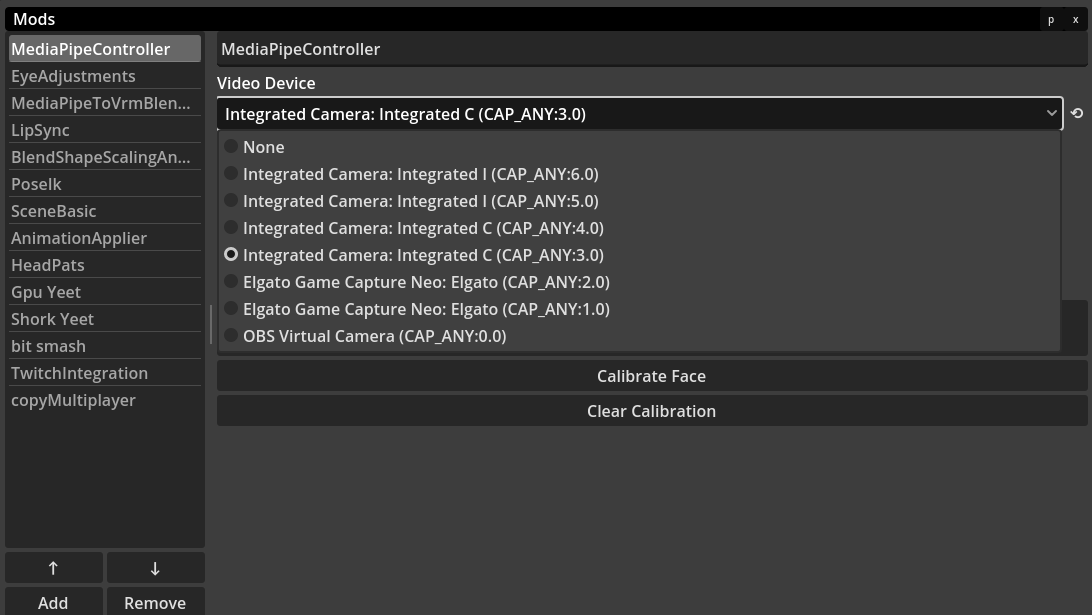
Once installed you can load your VRM via File -> Open VRM.... Next you can open Modules -> Mod List... to configure SnekStudio. On the first use you will need to configure the video device used by mediapipe for tracking.
WARNING
Currently you will see multiple entries for each camera, you can try the ones for the camera you plan on using until you find one that works.
TIP
If you do not have ARKit blendships, face tracking may not seem like it works/limited in movement. You can use the Lip Syncing mod, with the use basic blend shapes toggle enabled to get a "better" looking face, however it will not be as good as ARKit.
Extending SnekStudio
While the ecosystem for snekstudio is nascent you can add missing features via mods. Mods are written in gdscript. Mods are zip files wrapping the gdscript and tscn files. For the tarball PATH_TO_SNEKSTUDIO/Mods will contain the pre-supplied mods, and you can add yours here. For the flatpak, your mods can be placed in ~/.var/app/com.snekstudio.Snekstudio/config/SnekStudio/Mods. In many cases where features are missing you can if you choose write your own mods.