
Steam
Steam uses a fork of Wine called Proton, it includes a few patches to fix and optimize some games. There also several forks of Proton made by users that include even more fixes, one of them being Proton-GE, made by GloriousEggroll.
You can choose which Proton version to use through the game's properties menu.
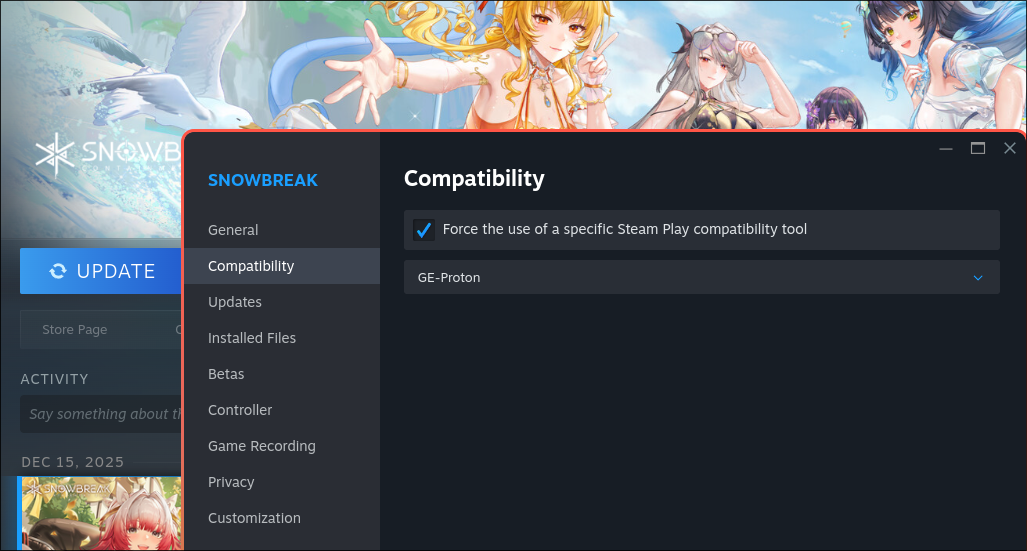
If you need to install Proton forks to fix some game, you can use third party tools:
Or install it manually:
- Download some Proton fork, for example: Proton-GE
- Extract it into
~/.steam/steam/compatibilitytools.d/ - Restart Steam
It should look something like this:
~/.steam/steam/compatibilitytools.d
├── LegacyRuntime
│   ├── compatibilitytool.vdf
│   ├── scout-legacy
│   └── toolmanifest.vdf
└── Some-Proton-fork
    ├── compatibilitytool.vdf
    ├── filelock.py
    ├── files
    ├── LICENSE
    ├── LICENSE.OFL
    ├── PATENTS.AV1
    ├── proton
    ├── proton_3.7_tracked_files
    ├── protonfixes
    ├── __pycache__
    ├── toolmanifest.vdf
    ├── user_settings.sample.py
    └── version
Launch options
You can set environment variables and flags through the game's launch options.
To check what launch options a game might need see protondb.
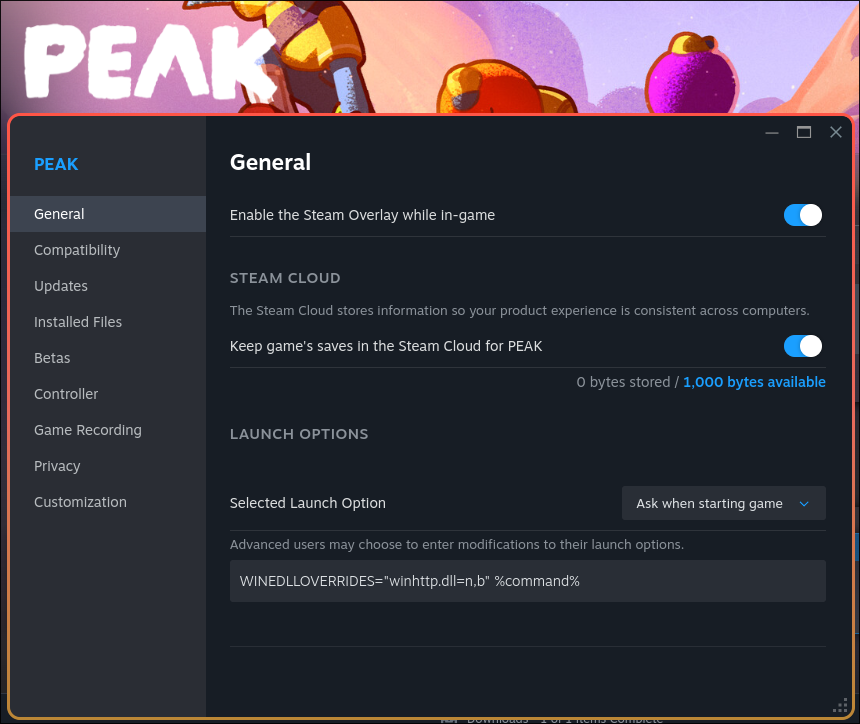
TIP
PEAK mods (BepInEx) require the DLL override for winhttp.dll
INFO
On NixOS, the only proton fork available at the moment in nixpkgs is proton-ge-bin, but you can easily override it to install other Proton forks.
programs.steam = {
  enable = true;
  gamescopeSession.enable = true;
  extraCompatPackages = with pkgs; [
    proton-ge-bin
    (
      (proton-ge-bin.overrideAttrs {
        pname = "proton-em-bin";
        version = "EM-10.0-2F";
        src = pkgs.fetchzip {
          url = "https://github.com/Etaash-mathamsetty/Proton/releases/download/EM-10.0-2F/proton-EM-10.0-2F.tar.xz";
          hash = "sha256-usjEAYEue2tQmOasQM46F1t0qJ1ouVmPyfl2hVlBzOg=";
        };
      }).override
      {
        steamDisplayName = "EM-Proton";
      }
    )
  ];
};